Local GUI for managing MCP servers and deploying AI Skills
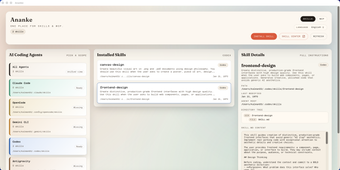
ananke, from Extrachatgpt Com, is a local-first desktop tool that simplifies management of Model Context Protocol servers and AI Skills. The app provides a graphical interface that replaces manual JSON editing and command-line setup, letting users organize, update, and deploy MCP-connected tools on their machine. Key elements include a Skill Hub for one-click deployment, visual toggles, and an integrated update flow. It targets developers, AI enthusiasts, and power users who value privacy and reduced configuration friction.
What tasks can you actually use it for?
Use the app to add and organize MCP endpoints, enable or disable specific skills, and deploy new capabilities from a central catalogue. The interface exposes actions that otherwise require hand-editing config files or running CLI commands, and the Skill Hub provides discovery plus one-click installation. Practical outcomes include faster setup of tool-access endpoints for models, simpler toggling of experimental skills, and a single point to manage MCP bindings.
How reliable are configuration changes and updates?
Configuration changes apply locally through the GUI, which reduces the manual JSON edits that commonly cause syntax errors. The app includes a streamlined update process for keeping MCP servers and associated tools current, so administrators can apply updates without invoking external scripts. Risk profile shifts from manual file errors toward update-related compatibility checks, since the tool automates deployment steps that previously required manual verification.
What input and environment requirements should you expect?
The app integrates with MCP-compliant AI clients and accepts pointers to local MCP server implementations, so usable inputs are existing MCP endpoints or skill packages. An internet connection is necessary only to download new skills from the Skill Hub; management and runtime configuration remain local. The desktop client runs on Windows, macOS, and Linux, which allows it to sit alongside a variety of local model setups.
Does it fit into developer workflows or help non-technical users?
The graphical approach reduces the need for command-line expertise, making MCP administration accessible to technically minded non-developers while keeping familiar controls for engineers. The local-first architecture keeps sensitive configuration data on-device, aligning with privacy-focused workflows. The curated Skill Hub centralizes extension discovery, which helps teams standardize capabilities, though integration still assumes familiarity with MCP concepts for meaningful use.
Practical choice for privacy-minded MCP users with a dependency caveat
ananke is a practical option for developers and power users who need a local GUI to manage Model Context Protocol servers and deploy skills quickly. It reduces manual configuration errors and centralizes extension discovery, but it depends on MCP-compliant clients and requires internet access to fetch new skills. For teams prioritizing on-device control of AI integrations, the app provides tangible workflow improvement.